SONATA reports
The goal of this document is to clarify the specification with respect to BBP needs. The original report documentation is located here
Spike file
Spikes are currently supported on the following model_type: biophysical, point_neuron.
Group |
Field |
Type |
Requirement |
Description |
|---|---|---|---|---|
/spikes/{population_name} |
timestamps |
float64 |
Mandatory |
The time when the spike is happening.
Units is defined by the |
/spikes/{population_name} |
node_ids |
uint64 |
Mandatory |
The node id of the cell spiking |
The population_name group has an HDF5 attribute sorting.
Possible values are none, by_id, by_time, note that this is an HDF5 enum:
The default order is by_time.
The i-th value of timestamps is a spike of the i-th node id cell in node_ids.
The timestamps dataset has a units attribute defining the unit of the timestamp.
Only ms is supported.
Frame oriented, element recordings
Compartment report
Group |
Field |
Type |
Requirement |
Description |
|---|---|---|---|---|
/report/{population_name} |
data |
float32 |
Mandatory |
The reported values.
Units is defined by the |
/report/{population_name}/mapping |
node_ids |
uint64 |
Mandatory |
The set of node ids (no duplicate). |
/report/{population_name}/mapping |
index_pointers |
uint64 |
Mandatory |
The offset for each node in the data field. |
/report/{population_name}/mapping |
element_ids |
uint32 |
Mandatory |
Represent the compartments as in NEURON, ordered by compartment IDs and grouped by nodes. For the ‘lfp’ report type, it represent the electrode IDs. |
/report/{population_name}/mapping |
time |
float64 |
Mandatory |
3 values defining start time, end time, and time step. end time is not part of the report. |
For a node node_ids[i], the data for all the recorded elements is determined by data[index_pointer[i]: index_pointer[i + 1]]. Therefore the length of index_pointer is the length of node_ids + 1 (as opposed to the shape define in the SONATA repository)
element_pos has mentioned in the SONATA paper is not supported at BBP.
The data field has a hdf5 attribute units of type string.
Hardcoded to mV for now at the BBP.
The node_ids field has an optional hdf5 attribute sorted of type uint8 (different from SONATA spec).
Default is 0 for not sorted.
This field is not implemented.
The time field has a property units of type string.
Hardcoded to ms.
For a full compartment reports, you need to specify both "sections": "all" and "compartments": "all" in the configuration:
"reports": {
    "full_compartment_report": {
        "cells": "Mosaic",
        "sections": "all",        # Report all sections
        "compartments": "all",    # Include all compartments
        "type": "compartment",
        "variable_name": "v",
        "unit": "mV",
        "dt": 0.1,
        "start_time": 0,
        "end_time": 1000
    }
}
Fine-grained Compartment report
To enable fine-grained control over which specific compartments are recorded, SONATA supports an extension using a compartment_sets.json file. This allows users to define sets of explicit compartment targets (e.g., dend[10](0.1)) for selected node_id.
File: compartment_sets.json
This JSON file defines named sets of compartment targets. Each set specifies the population and a list of [node_id, section_id, offset] lists:
{
  "example_compartment_set": {
    "population": "S1nonbarrel_neurons",
    "compartment_set": [
      [0, 1, 0.1],
      [0, 2, 0.3]
      [3, 5, 0.7],
    ]
  }
}
population: The name of the node population of thenode_ids incompartment_set.compartment_set: A list of lists, where each list is[node_id, section_id, offset]. Each of the[node_id, section_id, offset]lists is referred to as aCompartmentLocation.node_id: The ID of the node within the specifiedpopulation.section_id: The global index of a given section within its cell.offset: The fractional distance along the section (0<= offset <=1). NOTE: offset for a section encodes for the NEURON segment location e.g. 0.5 indend[10](0.5).
Note
The section_id is NOT the NEURON section index (e.g. 10 for dend[10]).
The section_index is calculated similar to get_section_index function of the neurodamus repository in neurodamus.reports.py.
Warning
The compartment_set list must be fully sorted, first by node_id, then section_id, and finally offset.
In addition, exact duplicates are not allowed.
Breaking either of these rules results in a malformed compartment_set.
Simulation Configuration
To use compartment sets, first declare the compartment_sets.json at the top level of your simulation_config.json.
Then, in your compartment report definition, set "sections": "compartment_set" and use the "compartments" field to specify the name of the desired set from your compartment_sets.json file.
{
  "compartment_sets_file": "circuit/compartment_sets.json",  // Path to your compartment sets file

  "reports": {
    "dend_report_v": {                              // Name of the report
      "type": "compartment_set",
      "compartment_set": "example_compartment_set", // Name of compartment_set, as above
      "variable_name": "v",
      "unit": "mV",
      "dt": 0.1,
      "start_time": 0.0,
      "end_time": 100.0
    }
    // ... other reports ...
  }
  // ... other global configurations ...
}
Note
When type and compartment_set are used, having a sections or compartments will result in an error.
The output HDF5 report format for these targeted compartment reports remains the same as described in the main Compartment report section.
Soma report
“Soma” report is a special case of compartment report where only the values for 1 compartment of the cell are reported. It can be reported at the soma or in the axon initial segment (AIS) depending on the configuration. In the case of multiple compartments for the soma or the axon, the one in the middle is used (as the split is an odd number). The element_ids are always 0.
For soma reports, you need to specify "sections": "soma" in the configuration.
Summation report
Summation report is similar to a compartment report. It usually reports a membrane current in nA (although the units field says mV).
The report uses ALU (Arithmetic Logic Unit) objects to sum multiple variables during simulation runtime.
Supported Variables
The report can handle various current sources:
IntrinsicCurrents: Channel-based currents (e.g., ina, ik, ica, i_membrane)SynapticCurrents: All synaptic currents- Individual current names examples:
Intrinsic:
ina,ik,ica,i_pas,i_cap,icsa_csa,ihcn_Ih,i_membraneSynaptic:
ProbAMPANMDA_EMS,ProbGABAA_EMSStimulus:
IClamp,SEClamp
For summation reports, you need to specify "type": "summation" in the configuration:
"reports": {
  "cell_imembrane": {
     "cells": "Column",
     "variable_name": "i_membrane,IClamp",  # Multiple variables to sum
     "sections": "soma",                    # Or "all" for different behavior
     "type": "summation",
     "unit": "nA",
     "dt": 0.1,
     "start_time": 0,
     "end_time": 1000
   },
  "synaptic_current": {
     "cells": "Column",
     "variable_name": "ProbAMPANMDA_EMS.i",
     "sections": "all",
     "type": "summation",
     "unit": "nA",
     "dt": 0.1,
     "start_time": 0,
     "end_time": 1000
   }
}
Reporting Behavior
The summation behavior changes based on the “sections” parameter:
- Cell Target (
"sections": "soma") The currents are summed across the entire cell but stored in a single value at the soma.
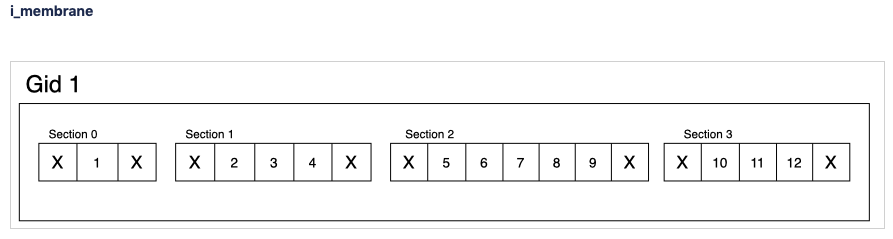
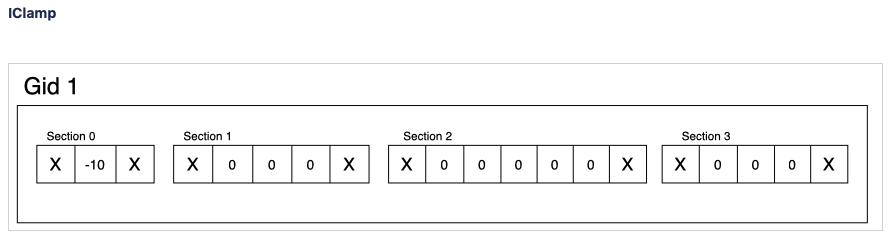
Compartment ids:
[0](stored in soma)Data:
[68](sum of all compartments: 1-10+2+3+4+5+6+7+8+9+10+11+12)Use case: When you need the total current across the entire cell as a single value
- Compartment Target (
"sections": "all") The currents are summed per compartment and kept separate.
Compartment ids:
[0, 1, 1, 1, 2, 2, 2, 2, 2, 3, 3, 3]Data:
[-9, 2, 3, 4, 5, 6, 7, 8, 9, 10, 11, 12]Use case: When you need to analyze current distribution across the morphology
Important Notes:
Variables are summed during simulation runtime
Multiple current sources can be combined in a single report
The report uses the same HDF5 structure as compartment reports
Synapse report
A specialized report for monitoring synaptic dynamics and plasticity. The report structure uses:
element_ids: Individual synapse identifiers (no specific ordering)node_ids: Identifiers of the post-synaptic cells.
Primary Use Cases:
STDP (Spike-Timing-Dependent Plasticity) analysis
Tracking synaptic weight changes
Monitoring synaptic conductance
Studying network plasticity
For STDP weight tracking, the report targets weight adjuster point processes rather than synapses directly. These processes are specialized components that handle the monitoring and modification of synaptic weights during plasticity. By targeting these processes instead of the synapses themselves, the report can efficiently track only plastic synapses while maintaining direct access to weight changes without impacting synaptic transmission performance.
For synapse reports, you need to specify "type": "synapse" in the configuration. Note that "sections": "all" must be included to capture synapses on all compartments; otherwise, only somatic synapses will be reported:
"reports": {
    "synapse_weights": {
        "cells": "Column",
        "type": "synapse",
        "variable_name": "StdpWADoublet.weight",
        "sections": "all",
        "unit": "nS",
        "dt": 0.1,
        "start_time": 0,
        "end_time": 1000
    },
    "exc_conductances": {
        "cells": "AllCompartments",
        "type": "synapse",
        "variable_name": "ProbAMPANMDA_EMS.g",
        "sections": "all",
        "unit": "nA",
        "dt": 0.1,
        "start_time": 0.025,
        "end_time": 100
    }
}
LFP report
A specialized report for recording Local Field Potentials (LFPs) that captures the aggregate electrical activity of neural populations. The report structure uses:
element_ids: Electrode identifiers defined in the electrodes_file (SONATA Technical description)node_ids: Identifiers of the contributing cells
LFP reports require a pre-calculated weight file (electrodes file) that defines the contribution of each compartment to the LFP signal at each electrode position.
The electrodes file is specified per-report via the electrodes_file field in each LFP report block.
Note
The variable_name field is not allowed for LFP reports.
LFP computation always uses the membrane current (i_membrane) combined with any injected currents from membrane current sources (e.g. MembraneCurrentSource, ConductanceSource).
The per-compartment total current is then multiplied by the electrode scaling factors from the weights file.
For LFP reports, you need to specify "type": "lfp", "electrodes_file", and "target_simulator": "CORENEURON" in the configuration:
"target_simulator": "CORENEURON",
"run": {
    "tstop": 40,
    "dt": 0.025,
    "random_seed": 12345
},
"reports": {
    "lfp_report_A": {
        "type": "lfp",
        "cells": "Mosaic",
        "dt": 0.1,
        "start_time": 0.0,
        "end_time": 40.0,
        "electrodes_file": "/path/to/electrodes_A.h5"
    },
    "lfp_report_B": {
        "type": "lfp",
        "cells": "Mosaic",
        "dt": 0.1,
        "start_time": 0.0,
        "end_time": 40.0,
        "electrodes_file": "/path/to/electrodes_B.h5"
    }
}
Important Notes:
Each LFP report must specify its own
electrodes_fileLFP reports are independent of each other; each report applies its own weights independently
Electrode positions must be defined before simulation
Uses same HDF5 structure as compartment reports
element_ids correspond to electrode positions
Requires
target_simulatorset to"CORENEURON"Commonly used for analyzing population-level activity
For more detailed information about LFP reports, please refer to the Online LFP Calculation Documentation.
Bloodflow report
A particular type of compartment report for vasculature nodes. It is actually a set of 3 report files that store for each time-step 3 values per segment of the vasculature:
radius (unit: µm)
blood pressure (unit: µm^3.s^-1)
blood flow (unit: g.µm^-1.s^-2)
Extracellular report
Not supported.